
Proof of the work you already do
Siteward records every update, every hour of uptime and every vulnerability across the sites you manage, then turns a month of it into a report with your name on it. Included with Pro. No per-site fee, no PDF wrangling, no spreadsheet.
The month, in one email
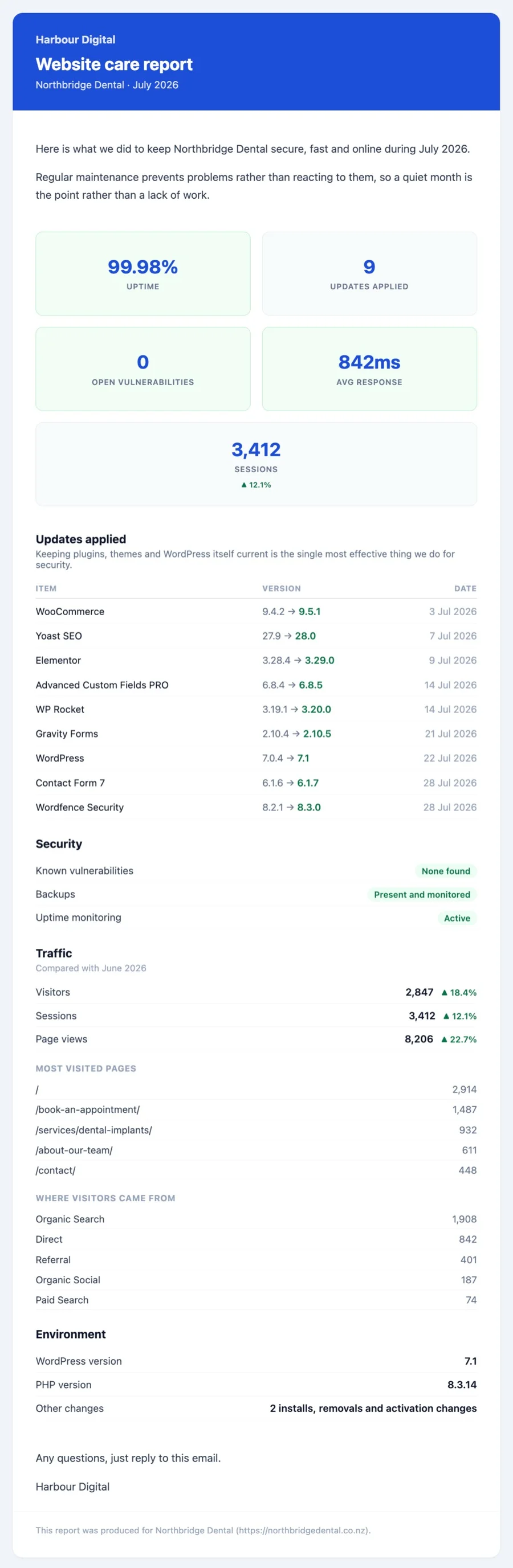
Care plans are sold on trust and renewed on evidence. Most maintenance work is invisible by design: nothing broke, nothing was exploited, nobody noticed. A monthly report is how that becomes something a client can see, and it is the difference between a renewal conversation and an awkward one.
Siteward builds it from what actually happened on the site, not from a template of intentions. Every plugin, theme and WordPress update applied during the month, with the versions moved between and the date. Uptime and average response time from the checks that ran. Known vulnerabilities, and whether they are still open. Backups. PHP and WordPress versions. Traffic, if you want it.
Nothing is invented and nothing is padded. If a month was quiet, the report says so, which is the point of the month being quiet.
Written for the person paying the invoice
Plain figures, no jargon, and a layout a non-technical client can read in thirty seconds.
A month at a glance
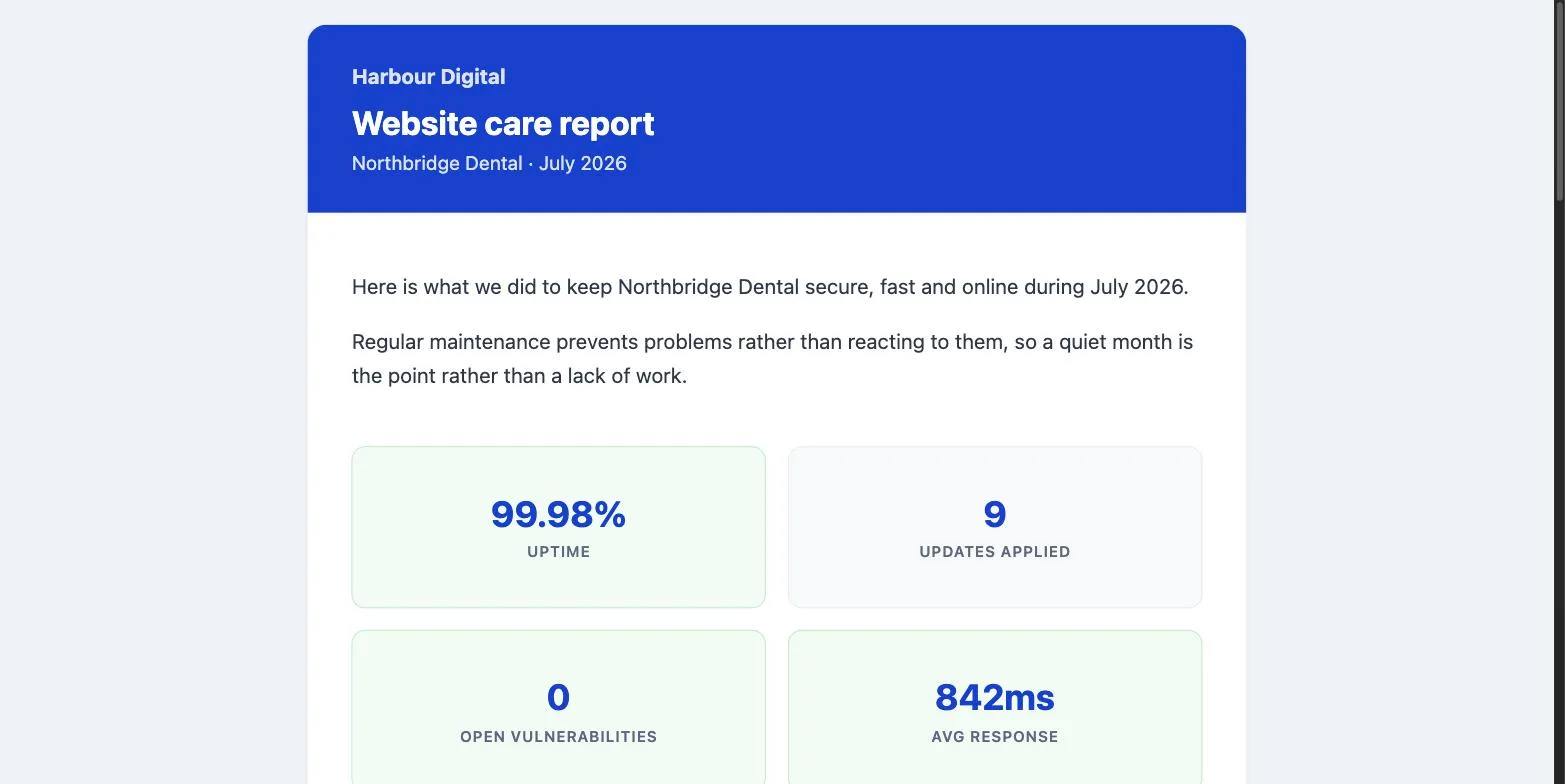
Uptime, updates applied, open vulnerabilities and average response time. Figures that are where they should be are highlighted, so a good month looks like one without anyone reading a number.
Every update, with versions and dates
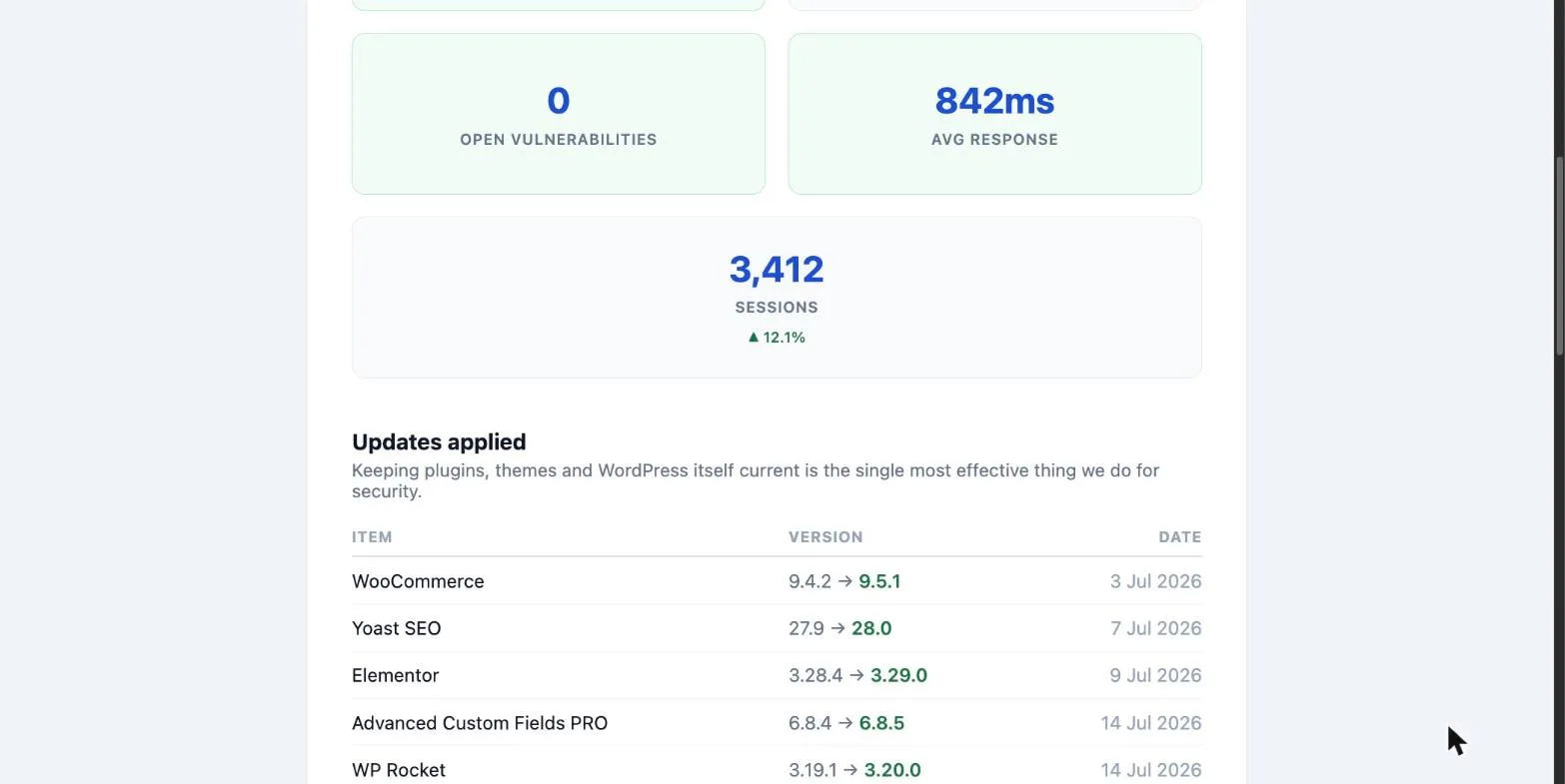
The part that justifies the invoice. Siteward notices updates applied by the client or by WordPress itself too, so the log is what happened to the site, not just what you did to it.
Traffic, if you want it
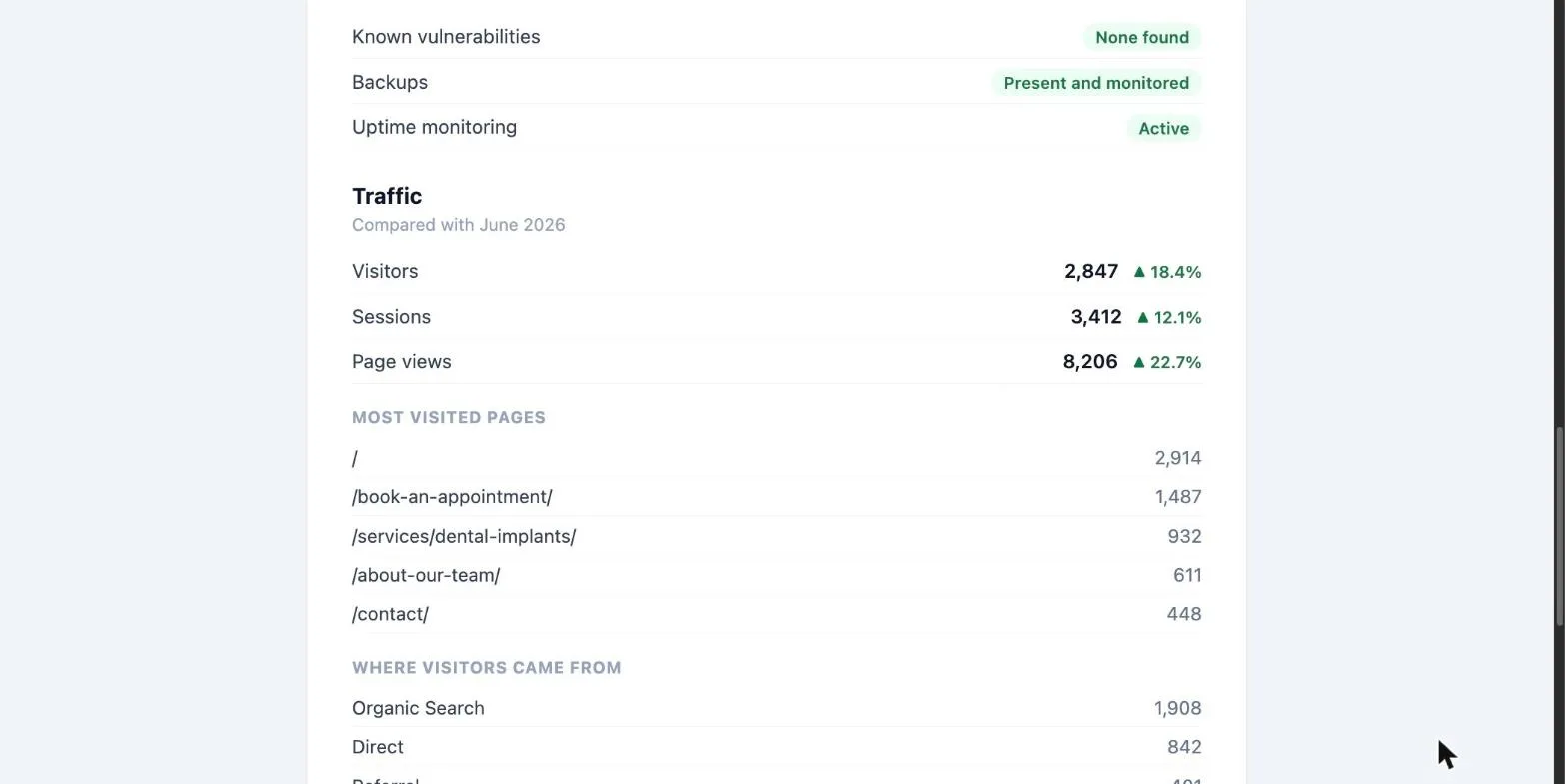
Connect Google Analytics and the report carries visitors, sessions, page views, top pages and traffic sources, with the movement against the month before or the same month last year. It connects through a service account in your own Google Cloud project, so there is no consent screen to maintain and nothing that expires after seven days. Leave it disconnected and the section simply is not there.
Your name on it, not ours
A report with a tool vendor’s branding is a report no agency sends. Every visible part belongs to you: agency name, logo, accent colour, subject line, heading, opening paragraph, sign-off and footer, with tokens for the site name, URL, period and your own name.
Siteward is not mentioned anywhere in the email. The client sees your logo, your words and your colours.
It will not flatter you
A traffic figure with nothing valid to compare against shows no percentage at all, rather than an impressive-looking number that means nothing. An unfinished month says so instead of comparing three weeks against four. A site whose analytics are misconfigured omits the traffic section rather than printing zeroes that read as a collapse.
The whole value of a report is that a client can believe it.
Everyone else charges by the site
Client reporting is usually where a flat tool quietly becomes a per-site one. Prices below are the vendors’ own, at the time of writing.
| Tool | White-labelled client reports | Cost across 50 sites |
|---|---|---|
| Siteward | Included with Pro, unlimited sites | $129/yr flat |
| ManageWP | Basic free; white-labelled and automated is a paid add-on | From $1 per site per month |
| WP Umbrella | Included, and good | Priced per site, every month |
| Modular DS | Included, a core strength | Priced per site, every month |
| InfiniteWP | Paid add-on, branding a further add-on | From about $97, plus branding |
| MainWP | Free extension | Included in the bundle |
MainWP is genuinely free here too, and WP Umbrella’s reports are among the best in the category. The difference is what happens as the fleet grows: a flat price stays flat.
How it works
- Install the add-on. It ships separately from Pro and is included at no extra cost, so a dashboard that never sends a report never carries the code that would.
- Choose the sites. Nothing is recorded for a site until you pick it, and nothing is stored for sites you do not.
- Set your branding once. Preview any site’s report as you go; what you approve is exactly what arrives.
- Send. Prefilled with the client’s address, editable so you can send yourself a test first.
Common questions
Can I white label WordPress client reports?
Yes. In Siteward every visible part of the report is yours: agency name, logo, accent colour, email subject, heading, opening paragraph, sign-off and footer, with tokens for the site name, URL and reporting period. Siteward is not named anywhere in the email the client receives. White labelling is included with Pro at no extra cost, unlike most tools in this category where removing the vendor's branding is a paid add-on priced per site.
What goes into a WordPress maintenance report?
A report worth sending is built from what actually happened, not from a template. Siteward includes every plugin, theme and WordPress core update applied during the period with the versions moved between and the date, uptime percentage and average response time from the checks that ran, known vulnerabilities and whether they are still open, backup status, and the WordPress and PHP versions. Google Analytics traffic is optional. Nothing is estimated.
Does Siteward charge per site for client reports?
No. Client reports are included with Siteward Pro, which is a flat price for unlimited sites. Most alternatives price reporting per site per month, so the cost grows with the fleet: ManageWP charges for white-labelled automated reports per site, WP Umbrella and Modular DS include reporting but price per site, and InfiniteWP sells reporting as a paid add-on with branding as a further one.
Are the reports PDF or email?
HTML email. A PDF adds a rendering dependency and an attachment for something a client reads once on a phone, so Siteward sends a properly designed HTML email instead, previewed through the same builder that sends it, so what you approve is exactly what arrives.
Do I need Google Analytics to use client reports?
No. Traffic is optional and the report is complete without it: updates, uptime, security and environment all come from the dashboard's own monitoring. If you do connect Analytics, it is through a service account in your own Google Cloud project, so there is no consent screen to maintain, nothing that expires after seven days, and access you grant and revoke per property inside Analytics.
How does Siteward know which updates were applied?
It compares each site's installed software against the last inventory it saw, so the log reflects what happened to the site rather than only what was done from the dashboard. Updates a client applied themselves, or that WordPress applied automatically, appear in the report too.
See it on your own sites.
Monitor unlimited sites free, or add Pro when you want expiry alerts, dynamic tags and integrations.